

You will agree that it is not easy to make the right choice from the wide range of sit-stand desks on the market. You probably won't be surprised either that bad purchases are often down to people being swayed too much by looks. Usually it is also a matter of not knowing enough. And that is exactly where we can help.
In this article, we set out the pros and cons of the most widely used technologies and give you a few quick checkpoints you can easily run through yourself, without being a specialist. You will know better what to look out for and what to ask the salesperson in the showroom.
Drawing on our extensive experience with office furniture, and height-adjustable office desks in particular, we have identified two criteria to help you make the right choice:
- Stability
- Adjustability
Interested in our tips?
Read on or watch our video below.
It shows you how to test the stability and adjustability of any model in the showroom yourself, using a few simple tests.
4 factors determine stability
Only a stable desk offers maximum comfort. We are sure you will agree. It must not wobble or move at the slightest nudge, and certainly not at its highest setting. The question, of course, is: how do you recognise a stable height-adjustable desk?
In our view, there are four key technical aspects:
- The position of the support point
- The strength of the frame
- The number of leg sections
- The position or orientation of the thickest part of the leg
We are happy to explain how to recognise and assess these four technical elements, so you can visit a showroom fully prepared.
What are the most common stability mistakes?
Stability seems obvious, but in practice it often isn't. Below we show where things go wrong and what the better solution is.
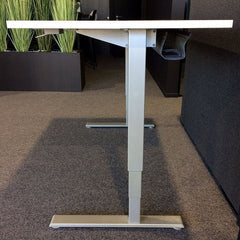
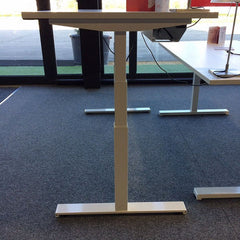
2. The strength of the frame:
NOT GOOD
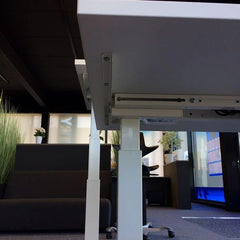
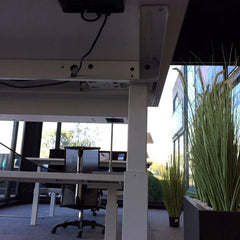
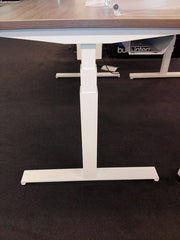
3. The number of leg sections:
LESS GOOD
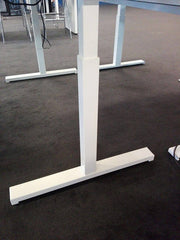
To reach the same height, both parts have to be longer, which makes a 2-section leg less stable. Especially when working standing up.
4. The position or orientation of the thickest part of the leg:
NOT GOOD
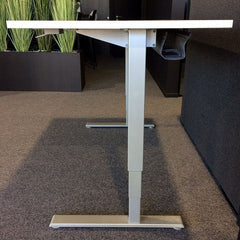
On this desk, the leg consists of telescopic sections with the thickest part at the top. This makes the leg top-heavy, which encourages instability.
BEST SOLUTION
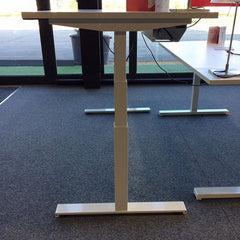
This leg has its thickest section at the bottom, giving the desk a stable base.
A stable standing desk has 3-section legs with the thickest part at the bottom. In addition, the two legs on the short sides are positioned in the middle of the desk. This means the support point is centred on the foot, so the weight on the desk is distributed optimally. Our sit-stand desks also feature a sturdy frame made with extra metal. Which, of course, also benefits stability.
Check it yourself with our simple stability test.
All this theory is all very well, but naturally you want to see for yourself. With this simple test, you can check the stability of any sit-stand desk in the showroom:

Take a glass and fill it to about 2 centimetres from the rim. Place the glass anywhere on the desktop. Now give the short side of the desk a few gentle pushes. On an unstable desk, water will spill out of the glass. On a stable desk, all the water stays neatly in the glass. Repeat the exercise on the long side of the desk. Watch this video for a short demonstration.
Get the most out of your adjustable standing desk thanks to its adjustability
As you will appreciate, the speed and ease with which the desk can be adjusted in height largely determine how often you will actually adjust it. Let's be honest: if adjusting it is too slow or too awkward, in practice you will rarely do it, if at all. And that would be a waste of your investment. So we have set out the pros and cons of the various systems on the market for you. That way you will know exactly which system is the best solution for you.
We take a closer look at three of them:
- the hand crank
- the gas spring
- the electric motor
We also demonstrate all three systems in this video.
ELECTRIC DRIVE
- effortless height adjustment
- works independently of the weight on the desk
- small electric motors are concealed in the frame
- intuitive control via a display with memory function ensures the right working height
HAND CRANK
- manual height adjustment is strenuous, depends on the weight and is slow
- cheaper solution
- no power connection needed
- hard to judge the right working height
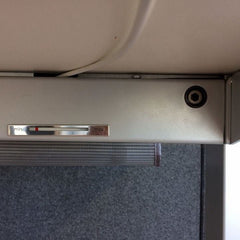
GAS SPRING
- proper operation depends heavily on the correct setting for the weight on the desk
- adjusting the setting to the weight is possible, but not practical
- cheaper solution
- no power connection needed
- hard to judge the right working height
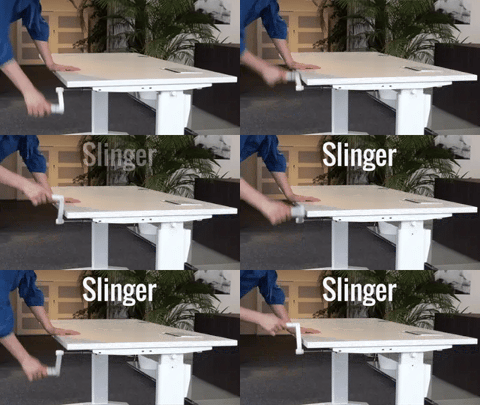
You can easily expect it to take half a minute to a full minute to move a desk from sitting to standing height.
That is a long time, a very long time... and the main reason why, in practice, you soon give up adjusting the height every time.
The gas spring: watch out for changes in weight

A gas spring works perfectly as long as the weight on the desk does not change.
This is because the gas spring is calibrated to a specific weight when it is installed.
If that weight changes, the gas spring will no longer work properly.
The electric drive: fast and with perfect control
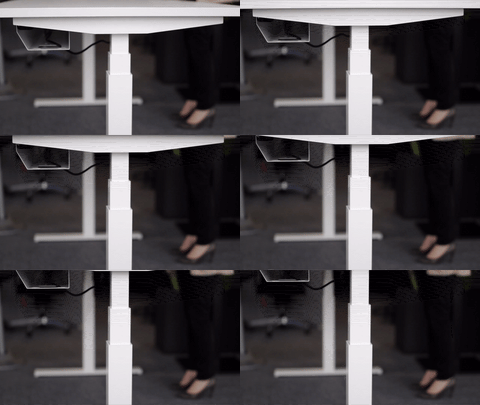
For our height-adjustable desks, we use an electric drive.
It lets you adjust the desk's height steplessly, regardless of the load.
Thanks to the small electric motors, you can adjust the height many times faster than with a hand crank.
And with an electric drive, you don't have the weight dependency of the gas spring system either.
Be sure to watch our video, in which we illustrate the pros and cons of the hand crank, the gas spring and the electric drive.
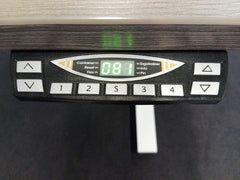
With a hand crank or a gas spring, it is always a bit of guesswork.
But there is a solution for this too.
Height-adjustable desks with an electric drive are often fitted with a digital display that always shows you exactly what height the desktop is at.
Thanks to the memory function, you can even programme several working heights. That is very handy if, for example, several people work at the same workstation.
You are always welcome in our showrooms
In our showroom we will be happy to talk you through all the pros and cons of the different systems again, and you can see the quality of our height-adjustable desks for yourself.